Deposit Policy Override Report
The Deposit Policy Override report allows users to track the reservations for which the deposit policies were modified, and the deposit amount was waived.
This report will be displayed only when the Deposit Policy Override feature setting is enabled.
Perform the following steps to generate the report:
Navigate to Reports ➜ Dynamic Reports ➜ Guests/Reservations ➜ Deposit Policy Override report.
Refer to the following table and fill in the fields.
|
Field |
Description |
|---|---|
|
Report Name |
Deposit Policy Override. |
|
Type |
This is a mandatory multi-select drop-down list that displays the following options:
|
|
Date Range |
This is a mandatory single-select drop-down list that displays the following options:
|
|
Start Date |
The start date for report generation that corresponds to the option selected in the Date Range field. The current property date is selected by default. This is a mandatory field that allows users to select any dates in the past or future. |
|
End Date |
The end date for report generation that corresponds to the option selected in the Date Range field. The current property date is selected by default. This is a mandatory field that allows users to select any dates in the past or future. This report can be generated for a maximum duration of 365 days. |
|
Override Type |
This is a mandatory multi-select drop-down list that displays the following options:
|
|
Account Status |
This is a mandatory multi-select drop-down list that allows users to select the reservation statuses to be included in the report. |
|
Group By |
This is a mandatory single-select drop-down list that allows users to select from the following options based on which the records will be grouped:
|
Click Run to generate the report.
Click Save to save the report under User Favorites section.
Sample Report
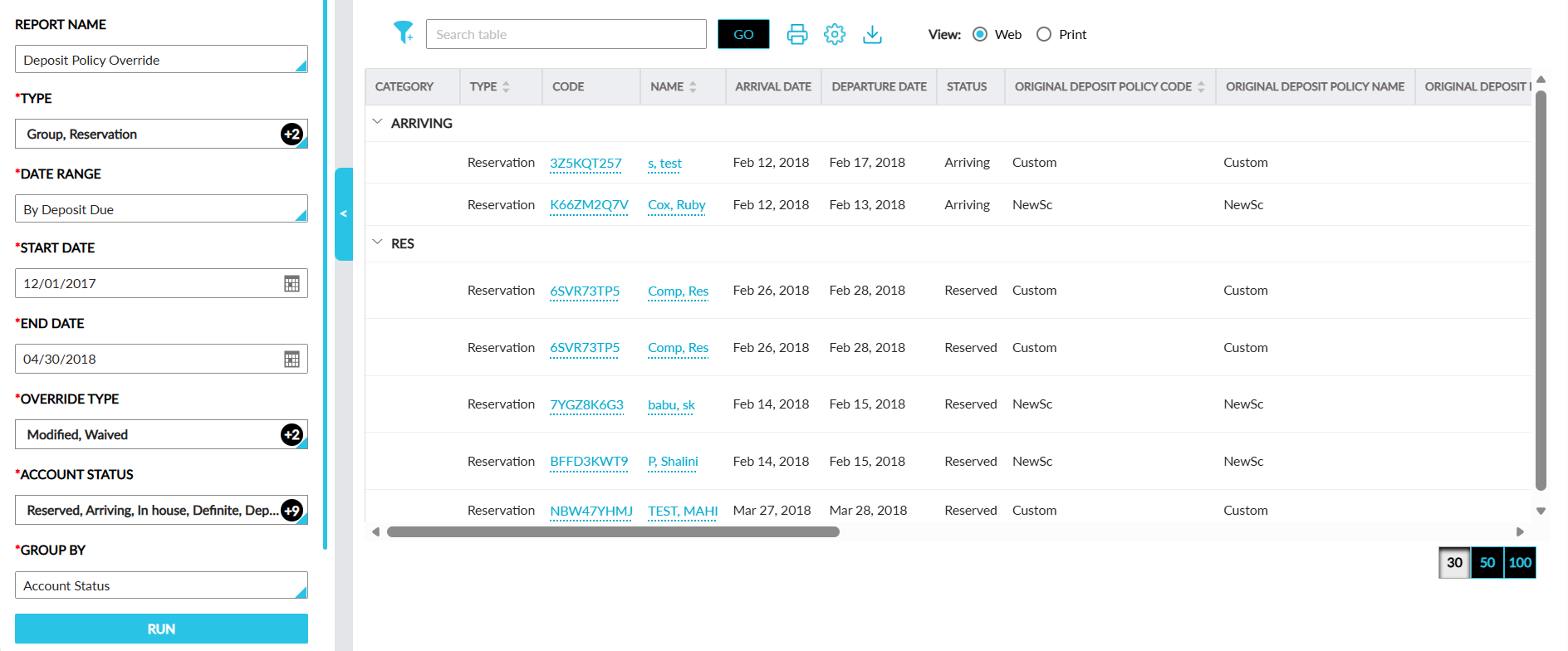
Report Fields
This report displays the following fields:
|
Field |
Description |
|---|---|
|
Category |
The records are categorized based on the options selected in the Group By field. When the Override Type option is selected, the records are grouped based on the deposit override types, Modified and Waived. When the Account Status option selected, records are grouped based on the account statuses. This column can be filtered. |
|
Type |
The type of the account, that is, reservation or group. This column is displayed only when the Deposit Policy Override feature setting is enabled. This column can be filtered and sorted. |
|
Code |
For reservations, this column displays the confirmation number and for groups, the group code is displayed as hyperlinks. When clicked, users are navigated to the respective reservations and groups. Users can search for a record using this value. |
|
Name |
For reservations, the guest name associated with the reservation is displayed and for groups, the group will be displayed as hyperlinks. This column can be sorted. |
|
Arrival Date |
For reservations, the arrival date is displayed and for groups, the arrival shoulder date is displayed. |
|
Departure Date |
For reservations, the departure date is displayed and for groups, the departure shoulder date is displayed. |
|
Status |
The status of the reservations or groups. This column can be filtered. |
|
Original Deposit Policy Code |
The deposit policy code prior to the deposit policy override. This column can be sorted. |
|
Original Deposit Policy Name |
The deposit policy name prior to the deposit policy override. |
|
Original Deposit Policy Value ($) |
The deposit amount prior to the deposit policy override. |
|
New Deposit Policy Code |
The deposit policy code after the deposit policy override. This column can be sorted. |
|
New Deposit Policy Name |
The deposit policy name after the deposit policy override. For overridden deposit policies, by default, the policy name is displayed as follows: CUSTOM – Custom or altered deposit policy. |
|
New Deposit Policy Value ($) |
The deposit amount after the deposit policy override. In case the deposit amount is waived, the amount is displayed as 0. For modified deposit policies, the modified amount will be displayed. |
|
Delta Policy Value |
The difference in deposit amount between the original and new deposit policies. |
|
Current Deposit Amount Collected |
The total deposit amount collected. The value, 0, is displayed when no amount is collected. |
|
Deposit Due Amount |
The deposit amount due for collection. |
|
Deposit Due Date |
The deposit due date. |
|
Overridden Date |
The date when the deposit policy was overridden. |
|
Overridden By |
The username of the user who performed the deposit policy override. This column can be filtered. |
|
Override Type |
The type of the deposit policy override, that is, modified or waived. This column can be filtered. |
|
Reasons |
The reason for the deposit policy override. This column can be filtered. |